

Annual subscription — pay once, relax all year
All plans are fully annual — no monthly subscriptions
Professional
- Contract editor and electronic signature
- Custom contracts and saved templates
- Official signer identity verification
- AI drafting and review assistant
- Contract alerts and signer reminders
- Your company logo in the contract
- UnavailableContracts in Arabic and English
- UnavailableMulti-party signing
Startups
- Contracts in Arabic and English
- A bigger signature balance and more contracts in your account
- UnavailableMulti-party signing
- UnavailableTeam members and internal approval
Enterprises
- Multi-party signing
- Admin actions: a direct manager for each member, and approvals before sending and deleting
- Approved company contracts and per-member permissions
- Access codes and token signing
- Collaborative editing
- “Verified company” badge after verifying your company
- Dedicated account manager
Strategy
- Public “sign it yourself” link
- In-person signing
- Campaigns and bulk sending
- Admin actions for a team of up to 10 members
- Unlimited custom contracts
- Account manager + dedicated support
Start free
Pay per signature request, no subscription
- Contract editor and electronic signature
- A completion certificate and audit trail for every document
- Download signed contracts free, with no limit
Developer
- Application programming interface (API)
- Software development kits (SDKs)
- Automatic event notifications (Webhooks)
- Templates
- Embedded signing on your site
- Delivery by email and WhatsApp
- Automatic reminders
- An evidence record for every signature
Business
- A signing page with your company's name, colours and welcome text, without mentioning Wthaiq
- Return to your site after signing
- Your company's own domain
- Signing in order
- Workflows
- External integrations: Google Drive, OneDrive and Dropbox
Enterprise
- Bulk sending through the API
- Signer attachments
- Access code
- Sign with your token
- Access restricted to specific IP addresses
- Priority support
Custom
- More than 12,000 sends a year by contract
- Unlimited members
- Terms and prices by contract
Start free
Try the API integration in test mode
- Free test mode with daily limits
- One portal member
- UnavailableLive sending (non-test)
How your balance works
How your balance works
Compare plans
The bigger your plan, the lower the cost per signature
| The feature | ||||
|---|---|---|---|---|
| 40 | 100 | 250 | 600 | |
| 5 | 15 | 50 | No limit | |
| 1 | 1 | 5 | 10 | |
| 2.23 | 1.89 | 1.52 | 1.25 | |
| Separate from your plan, in bundles of at least 10: $1.50 per check | ||||
| Available | Available | Available | Available | |
| Unavailable | Unavailable | Available | Available | |
| Unavailable | Unavailable | Unavailable | Available | |
| Unavailable | Unavailable | Unavailable | Available | |
| Available | Available | Available | Available | |
| Available | Available | Available | Available | |
| Available | Available | Available | Available | |
| Available | Available | Available | Available | |
| Available | Available | Available | Available | |
| Available | Available | Available | Available | |
| Available | Available | Available | Available | |
| Available | Available | Available | Available | |
| Available | Available | Available | Available | |
| Available | Available | Available | Available | |
| Available | Available | Available | Available | |
| Available | Available | Available | Available | |
| Available | Available | Available | Available | |
| Available | Available | Available | Available | |
| Unavailable | Unavailable | Available | Available | |
| Unavailable | Unavailable | Available | Available | |
| Available | Available | Available | Available | |
| Available | Available | Available | Available | |
| Available | Available | Available | Available | |
| Available | Available | Available | Available | |
| Available | Available | Available | Available | |
| Unavailable | Available | Available | Available | |
| Available | Available | Available | Available | |
| Unavailable | Unavailable | Available | Available | |
| Available | Available | Available | Available | |
| 20 versions | 20 versions | 100 versions | 100 versions | |
| Available | Available | Available | Available | |
| Unavailable | Unavailable | Available | Available | |
| Unavailable | Unavailable | Available | Available | |
| Unavailable | Unavailable | Available | Available | |
| Unavailable | Unavailable | Available | Available | |
| Unavailable | Unavailable | Available | Available | |
| Unavailable | Unavailable | Available | Available | |
| Unavailable | Unavailable | Available | Available | |
| Unavailable | Unavailable | Available | Available | |
| Unavailable | Unavailable | Available | Available | |
| Unavailable | Unavailable | Available | Available | |
| Unavailable | Unavailable | Available | Available | |
| Unavailable | Unavailable | Available | Available | |
| Unavailable | Unavailable | Available | Available | |
| Available | Available | Available | Available | |
| Unavailable | Unavailable | Unavailable | Available | |
| Available | Available | Available | Available | |
| Available | Available | Available | Available | |
| Available | Available | Available | Available | |
| Available | Available | Available | Available | |
| Available | Available | Available | Available | |
| Available | Available | Available | Available | |
| Available | Available | Available | Available | |
| Available | Available | Available | Available | |
| Available | Available | Available | Available | |
| Available | Available | Available | Available | |
| Available | Available | Available | Available | |
| Available | Available | Available | Available | |
| Available | Available | Available | Available | |
| Available | Available | Available | Available | |
| Available | Available | Available | Available | |
| Available | Available | Available | Available | |
| Available | Available | Available | Available | |
| Available | Available | Available | Available | |
| Available | Available | Available | Available | |
| Available | Available | Available | Available | |
| Email and contact form | Email and contact form | Email and contact form + priority | Email and contact form + priority | |
| Unavailable | Unavailable | Available | Available | |
| Unavailable | Unavailable | Unavailable | Available | |
| Unavailable | Unavailable | Unavailable | Available | |
| Unavailable | Unavailable | Unavailable | Available | |
| Not included in the Teams plans; they have their own annual developer plans See the developer plans | ||||
Click any feature in the table to see what it means.
Compare developer plans
The bigger your plan, the less each extra send costs
| The feature | ||||
|---|---|---|---|---|
| 600 | 2,400 | 6,000 | 12,000+ | |
| 1.06 | 0.85 | 0.64 | By contract | |
| 0.88 | 0.71 | 0.53 | By contract | |
| 2 | 5 | 15 | No limit | |
| Available | Available | Available | Available | |
| Available | Available | Available | Available | |
| $1.50 per check, deducted from the wallet | ||||
| Available | Available | Available | Available | |
| Available | Available | Available | Available | |
| Available | Available | Available | Available | |
| Available | Available | Available | Available | |
| Available | Available | Available | Available | |
| Available | Available | Available | Available | |
| 100 requests every 10 seconds | 100 requests every 10 seconds | 100 requests every 10 seconds | 100 requests every 10 seconds | |
| Available | Available | Available | Available | |
| Available | Available | Available | Available | |
| Available | Available | Available | Available | |
| Available | Available | Available | Available | |
| Available | Available | Available | Available | |
| Available | Available | Available | Available | |
| Available | Available | Available | Available | |
| Available | Available | Available | Available | |
| Available | Available | Available | Available | |
| Available | Available | Available | Available | |
| Available | Available | Available | Available | |
| Available | Available | Available | Available | |
| Available | Available | Available | Available | |
| Available | Available | Available | Available | |
| Available | Available | Available | Available | |
| Unavailable | Available | Available | Available | |
| Unavailable | Available | Available | Available | |
| Unavailable | Available | Available | Available | |
| Unavailable | Available | Available | Available | |
| Unavailable | Available | Available | Available | |
| Unavailable | Unavailable | Available | Available | |
| Unavailable | Unavailable | Available | Available | |
| Unavailable | Unavailable | Available | Available | |
| Unavailable | Unavailable | Available | Available | |
| Unavailable | Unavailable | Available | Available | |
| Unavailable | Unavailable | Available | Available | |
| Unavailable | Available | Available | Available | |
| Unavailable | Available | Available | Available | |
| Unavailable | Available | Available | Available | |
| Available | Available | Available | Available | |
| Available | Available | Available | Available | |
| Available | Available | Available | Available | |
| Available | Available | Available | Available | |
| Available | Available | Available | Available | |
| Available | Available | Available | Available | |
Click any feature in the table to see what it means.
Enhance your plan with these add-ons
Services you add to your plan when you need them
Signer identity check
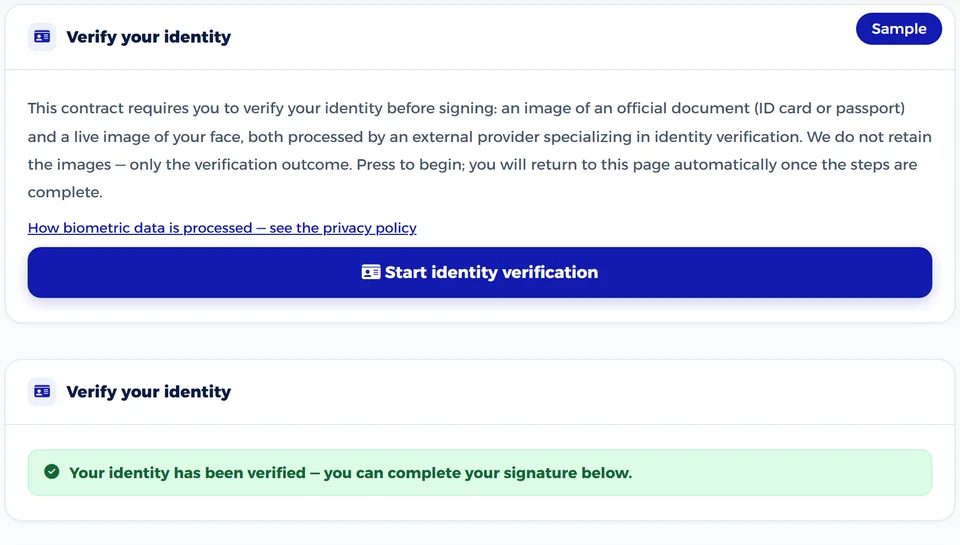
The signer verifies their identity with an official ID and a live photo of their face before signing.
Extra signatures
If your yearly allowance runs out early, add signatures without upgrading your plan.
WhatsApp delivery
The signing link reaches the signer by WhatsApp as well as email.
Enhance your plan with these add-ons
Services you add to your plan when you need them
Identity verification from your wallet
The signer verifies with an official ID and a live face photo, charged to your wallet.
Extra sends from your wallet
Keep sending after your plan's allowance runs out, at a rate that falls as plans grow.
Pricing questions
Every developer plan has a yearly send allowance. If you go beyond it, sending continues and each extra send is deducted automatically from your prepaid wallet at your plan's rate: $1.06 on Developer, $0.85 on Business and $0.64 on Enterprise. The minimum top-up is $100, and the wallet balance never expires.
A signer identity check is deducted from your wallet when you request it in a signature request: $1.50 per signer.
Test mode is free on every plan, including Trial, within daily limits: 20 test requests and 50 emails a day, and at most 5 signers per request. It lets you try the integration at no cost, identity verification is simulated and no WhatsApp messages are sent, but its signatures carry no legal validity. Live sending needs a paid developer plan and a verified company on your account, and produces real signatures with a full evidence record.
One send is one signer on a signature request, so a contract signed by three parties counts as three sends from your plan balance, with a maximum of five signers per request.
Yes — all our plans are fully annual. There is no monthly plan, and an annual plan costs far less than paying for each signature request separately.
The yearly signature allowance is 40 on the Professional plan, 100 on Startups, 250 on Enterprises and 600 on Strategy. One signature is deducted for each party you send the contract to.
Prices are shown and charged in your country's currency automatically, and the full amount due appears in the payment window before you confirm it.
No. The Teams plans are for working from the dashboard, while integrating through the API and webhooks has its own annual developer plans in the «Developers (API)» tab: they start free with a test mode with daily limits, and extra sends and identity checks are deducted from a prepaid wallet.
You can buy extra signatures from your dashboard, or upgrade to a higher plan at any time. Downloading your signed contracts stays free either way.
Yes. When you upgrade mid-year you move to the higher plan immediately, the remaining value of your current subscription is deducted from its price, and your new year starts on the day you upgrade. Moving to a lower plan takes effect when your current year ends, and you keep your current plan's features until then.
Yes. An electronic payment receipt is sent to your email once the payment is complete.
You pay by debit or credit card or through PayPal, and the payment window shows the methods available to your account. Card details go directly to the payment provider over an encrypted connection and are never stored on our servers.
Contact us and we will set limits that fit your contract volume, instead of you paying for what you do not use.
Ready to start?
Start free and pay per signature request, or subscribe for a yearly signature allowance
Start integrating
Start free in test mode, and choose your plan when you move to live sending
A yearly balance, not a monthly one
Your signature balance is yearly and starts on your subscription date. Use it whenever you like during the year with no monthly cap; it renews at the start of your next year.
You pay for sending, not for paper
One signature is used for each party you send the contract to. Downloading a signed contract is free and unlimited, while a contract you write yourself downloads with a “Draft” watermark until it is fully signed. If you cancel a request before the other party opens it, the signature comes back to you.
Upgrade at any time
If you need higher limits before the year ends, you can upgrade at any time: you move to the higher plan immediately, the remaining value of your current subscription is deducted from its price, and your new year starts on the day you upgrade. Moving to a lower plan takes effect when your current year ends.
A yearly send allowance
One send is one signature request on one contract, however many signers it has. Your plan's send allowance is yearly: it starts on your subscription date and renews with your next year. Test mode is free on every plan, within daily limits.
Extra use is charged to your wallet
Every developer plan has a yearly send allowance. If you go beyond it, sending continues and each extra send is deducted automatically from your prepaid wallet at your plan's rate: $1.06 on Developer, $0.85 on Business and $0.64 on Enterprise. The minimum top-up is $100, and the wallet balance never expires.
Identity verification per signer
A signer identity check is deducted from your wallet when you request it in a signature request: $1.50 per signer.
Signer identity check
When you request it, the signer verifies their identity before signing with an official ID (card or passport) and a live photo of their face through a specialist third-party provider, tying the signature to a specific person. The result appears on the completion certificate, and one identity credit is used per signer.
- Separate from your plan, in bundles of at least 10
- One credit per signer you ask to verify
- The unit is returned if the send is canceled, the link expires, or the signer declines before verification starts
Extra signatures
Buy extra signatures from your dashboard whenever you need them, and keep sending without changing your plan.
- One signature is used for each party you send a contract to
- Buy it from your dashboard at any time
- If you need more, you can upgrade at any time
WhatsApp delivery
The signing link reaches the other party by email, and by WhatsApp too if you add their number; for contracts you can send by WhatsApp number alone. WhatsApp messages carry no extra charge.
- Signing link
- Verification code before signing
- Signer reminders
Identity verification from your wallet
When you request identity verification, the signer verifies with an official ID and a live face photo through a specialist third-party provider, charged to your wallet. The result reaches you via webhooks, and you can query it through the API.
- The result reaches you by webhook as soon as it is decided
- Query it through the API
- Charged only when you request it in a signature request
Extra sends from your wallet
If you go over your plan’s sends, sending continues as long as your prepaid wallet has funds, and each extra send is deducted from it automatically at your plan’s rate, which falls as plans grow.
- The wallet balance never expires
- Minimum top-up: $100
- Top it up whenever you like from the developer portal
Signatures per year
Your yearly allowance of signature requests. One signature is used for each party you send a contract to, so a contract sent to two parties uses two. The allowance renews at the start of your next subscription year, and you can buy extra signatures if you run out sooner.
Custom contracts in your account
How many contracts you write or upload can sit in your account at the same time without being fully signed, whether sent or not. A fully signed contract no longer counts, which frees a slot for a new one. The Strategic plan has no limit.
Team members
The number of seats in your account; each member has their own sign-in and permissions. The Professional and Startup plans are single-user, and team features start with the Enterprise plan.
Cost per signature
The yearly plan price divided by its signature allowance, to make plans easy to compare. It is for comparison only, since each plan includes more than signatures.
Identity verification credit
Official identity verification isn't deducted from your signature balance but from a separate balance you buy in packs of at least ten units. One unit is deducted for each signer whose identity you require to be verified, and it returns to you if you cancel the send, the link expires, or the signer declines, before verification starts.
Signature request to one party
Send a contract to one other party, who receives a secure signing link. You follow the request from your dashboard: sent, opened, signed.
Multi-party signing (sequential or parallel)
One contract is sent to several parties: either in order, so it does not reach the next party until the previous one signs, or to all of them at once. The contract is complete only when everyone has signed.
Public “sign it yourself” link
One link you publish on your website or send to anyone you choose; each visitor fills in their details and signs their own copy of the contract, without you sending each of them a separate request.
In-person signing
The other party signs on your device while present with you, using identity verification or a token, and the signature is recorded in the contract’s event log. One identity credit is used when you choose identity verification.
Signing an uploaded PDF
Upload a ready PDF and choose who signs it, with nothing to retype. Every plan can send it to one party; Enterprise and Strategic can send it to several. The final copy is built on our server on top of your original file, so its content stays as it is and the signatures are added to it.
Delivery by email and WhatsApp
The signing link reaches the other party by email, and by WhatsApp too if you add their number; for contracts you can send by WhatsApp number alone. WhatsApp messages carry no extra charge.
Send copies (CC)
When you send from the “New signature” window in your dashboard, add email addresses for people who do not sign, such as your accountant or lawyer; each receives a link to the signed copy once signing is complete. Up to twenty addresses per contract, for contracts rather than uploaded PDFs.
Cancel a request and recover the signature
You can cancel any request that is not yet complete. If you cancel before the other party opens it, within the same subscription year, the signature returns to your allowance, and the identity credit returns if verification has not started.
The second party signs without creating an account
Signers do not need to register or install anything; they open the link from their email or WhatsApp and sign in the browser.
Signing invitation valid for seven days
The signing link stays valid for seven days, with reminders while the signer has not signed. It then expires, so old requests do not stay open indefinitely.
Signing page in Arabic and English
The signing page opens in the language of the request, and the signer can switch between Arabic and English at any time. This is separate from the contract’s own language, listed under “Contract creation”.
Mobile signing without an app
The signing page is designed for phone screens, so the other party can sign with a finger from their phone’s browser, with nothing to install.
Fields completed by the signer
Leave the fields you need from the other party empty in the contract, such as their name, national ID and address, and they appear as fields to complete before signing. Fields can be text, number, date, email or phone.
Request an ID attachment
Ask the signer to upload a photo of their ID card or passport with their signature; it is stored with the contract for you to review. It is an attachment you see, unlike official identity verification, which checks the document and its holder’s face. Available for single-party contracts and for every signer of an uploaded PDF.
Decline with a reason
The other party can decline to sign and give a reason after confirming a code, and the decline and its reason reach you and are recorded in the contract’s event log.
Consent to sign electronically
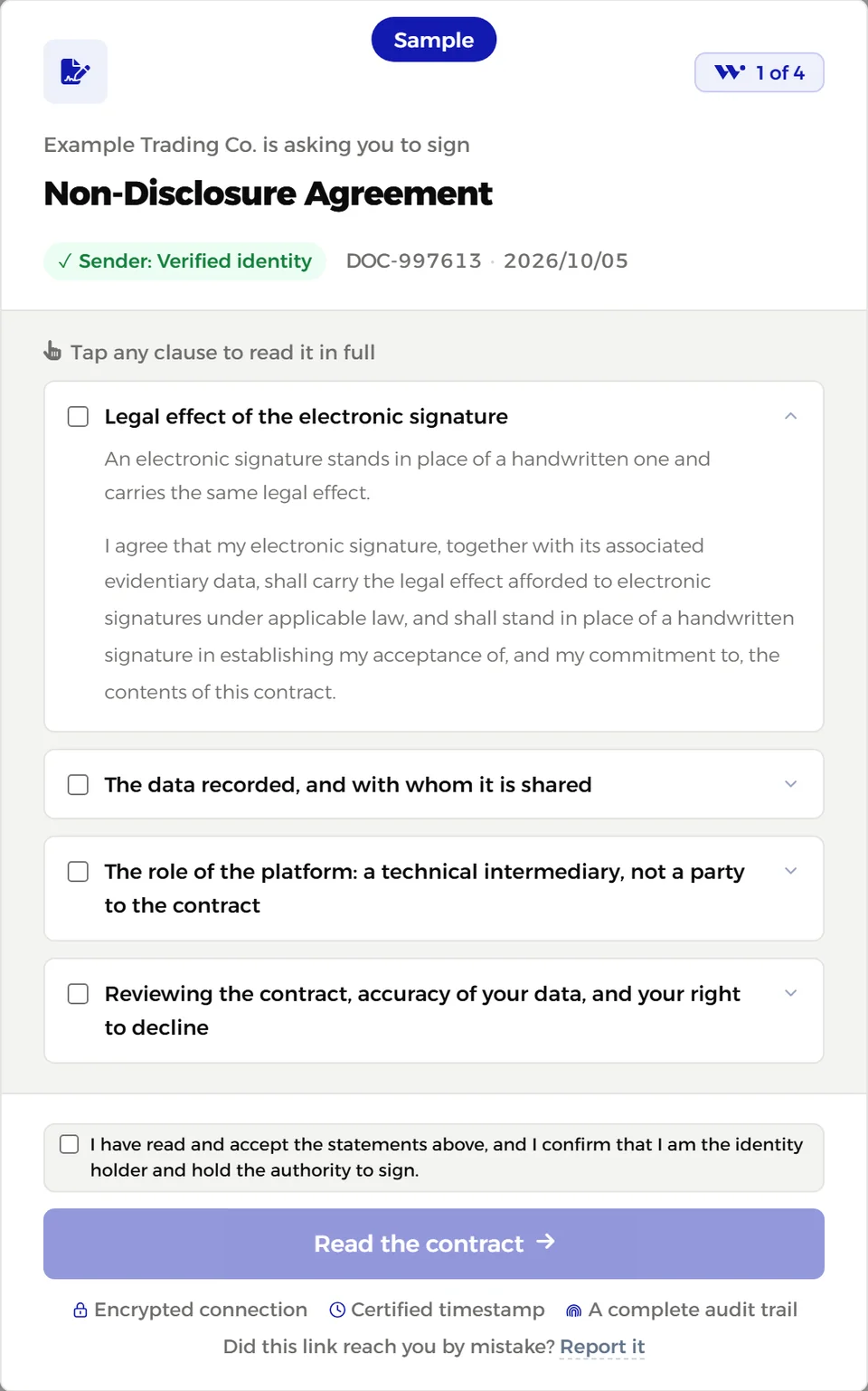
Before signing, the signer reviews a short declaration: their agreement that their electronic signature carries the effect given to electronic signatures under applicable law, what data is recorded with it, and that the platform is a technical intermediary, not a party to the contract. The signature is accepted only after they agree.
Final copy to every signer by email
When signing is complete, every signer with an email address receives a message with a link to the final copy and its verification number, so they keep their own proof without asking you.
Official signer identity verification
When you request it, the signer verifies their identity before signing with an official ID (card or passport) and a live photo of their face through a specialist third-party provider, tying the signature to a specific person. The result appears on the completion certificate, and one identity credit is used per signer.
Access code for the signing link
A code you set and give to the other party through a separate channel; the signing link opens only when it is entered, even if the link reaches someone else.
Signing with a digital certificate (token) issued by an ITIDA-licensed certification authority
The signer uses their digital certificate stored on a token issued by an electronic certification provider, and the signature is embedded in the PDF itself using the PAdES standard. The platform checks the certificate and its issuing chain, and the completion certificate shows a “Token signature” badge only for signatures that pass this check.
One-time code before signing (email or WhatsApp)
Before the signature is accepted, the signer receives a six-digit code by email or WhatsApp, proving they own the address or number you sent to. Successful verification is recorded in the contract’s event log.
“Verified identity” badge for the sender
Once you verify your identity in your account, the parties you send to see a “Verified identity” badge in the invitation and on the signing page. The badge also appears on the completion certificate of contracts signed after your verification.
Free-form contract editor
Write your contract from scratch in an Arabic-ready editor, with headings and clauses, and place party fields and signature spots.
Uploading your documents for signature (PDF and Word)
Upload a file you already have and prepare it for signing without retyping it.
Custom contracts and saved templates
Save your contract as a template and reuse it with each new client by changing only the details.
Contracts in Arabic and English
Create and download contracts in English as well as Arabic, for dealing with foreign parties. Available from the Startup plan up; the Professional plan is Arabic only.
AI drafting and review assistant
An assistant in the editor that suggests clause wording, reviews the contract and flags what may be missing, and translates text. Its suggestions are drafts for you to review, and they do not replace professional legal review.
Collaborative editing
Your team members work on the same contract, suggesting edits and commenting on them, and you accept or reject the edits before sending.
Signatures and stamps saved for reuse
Save your signature and company stamp once and use them on every contract. Neither can be edited after first use, so what was signed stays fixed.
Contract version history
The editor keeps versions of your contract as you edit, so you can review earlier versions and restore any of them. Professional and Startup keep the last twenty versions per contract; Enterprise and Strategic keep the last hundred.
Clause library and saved clauses
Insert ready clauses from the editor’s library, and save the clauses you reuse so you can add them to any later contract in one click.
Share saved clauses with your team
Make a saved clause available to everyone in your account, so the whole team uses the same wording.
Team members and roles
Add members to your account, each with a role that sets what they can do, while all company contracts stay in one account.
Approval of company contracts before use
A member drafts a contract, their direct manager approves it once and decides who may use it, and the team then uses it without new approvals. The approved text changes only with approval.
Transferring contracts between members
When a team member leaves, you move their contracts to another member, so they stay in the company account and are not lost.
Locked approved contracts
Once a company contract is approved, its text is locked so no one changes it directly; any change is submitted as a proposal awaiting approval. Only members you allow can propose edits.
Verified company badge
After we review your company’s details and commercial registration, a “Verified company” badge appears on your account and to the parties you send contracts to.
Admin actions: a team with direct managers and approvals before sending and deleting
Each member sits under their direct manager in the team tree, so requests to send for signature, to cancel sending and to delete go to that manager, and move up to the next level if they are not answered within the time you set.
Custom permissions for each member
You give each member only what they need, such as creating, sending, downloading, deleting and using the company seal, and a closed permission stays visible to them but disabled.
Managers who approve their team requests
You make any member the direct manager of others, so they approve their contracts and accept or reject their requests within their own permissions, while you keep the final say on every request.
Contract visibility scope for each member
You decide for each member whether they see only their own contracts, the contracts of their team, or all contracts of the company.
Team activity log
A log of the contract activity the platform records for your team members, such as creating, sending, downloading and deleting, with the time of each, which you can filter by member.
Monthly sending limit for each member
You set a maximum number of sends per month for each member; they stop there until the limit renews the following month.
Notification when team contracts are signed
You get a notification when a contract sent by one of your team members is fully signed, together with an email if you switch it on.
Company logo in the contract
Upload your company logo once in your account settings, and it appears in the header of your contracts when you view and download them.
Campaigns and bulk sending
You send the same contract to many parties at once from a file of their details; each party receives their own copy filled in with their name, and you follow the whole campaign from one screen.
Signer reminders
Signers receive automatic reminders by email, and by WhatsApp when they have a number, while they have not signed and the link is still valid.
Contract expiry and renewal alerts
Set a reminder date for any contract and receive three alerts by email and in your dashboard: thirty days before, seven days before, and one day before.
Folders, favorites and archiving
Organize contracts in folders, star the important ones, and archive finished ones to keep your list tidy.
Automatic folder per signer
When you send, a folder is created in the signer’s name, or their existing folder is used, so each client’s contracts are in one place.
Read-only document sharing
Share a link that lets anyone view the document read-only, without signing or editing.
Permanent document archive
Your account keeps a record of every document you created, and the record remains even if you delete the document itself.
A completion certificate attached to every document
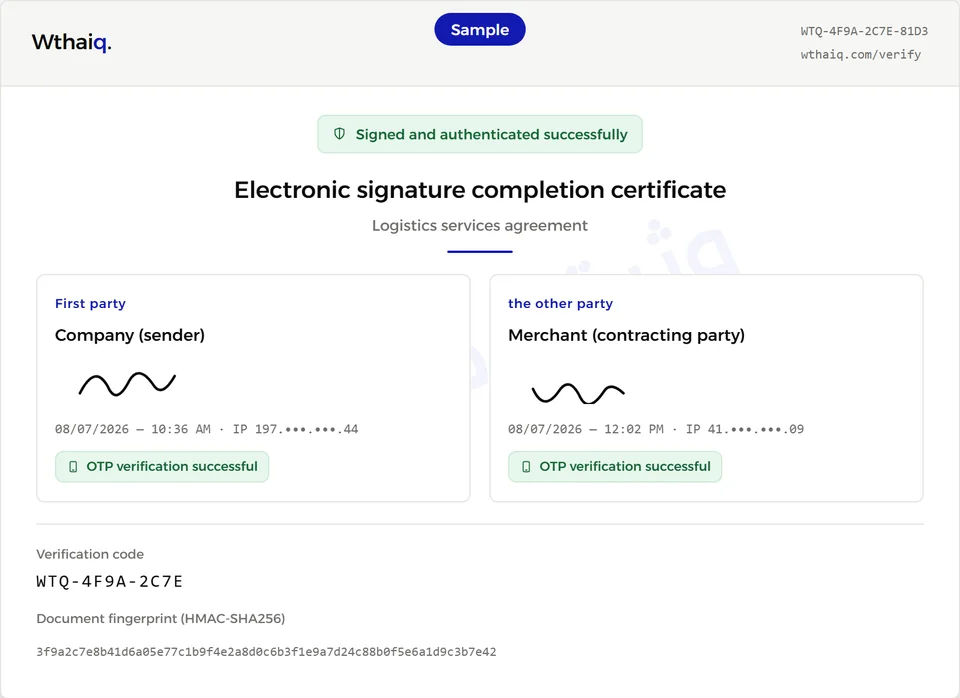
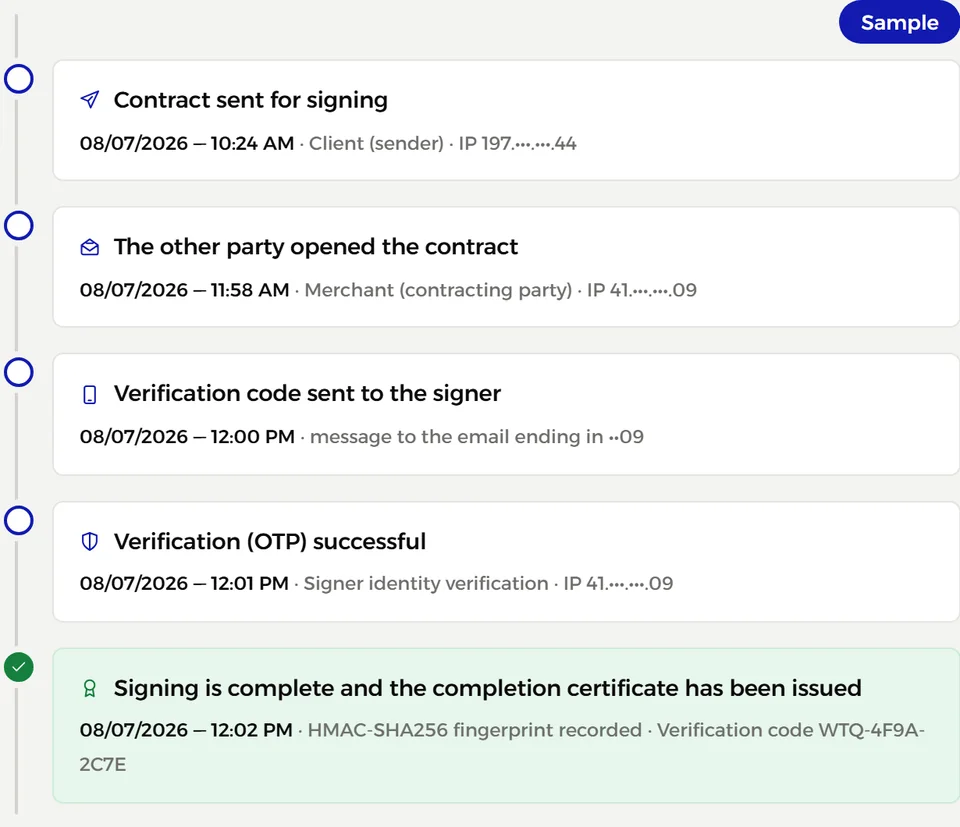
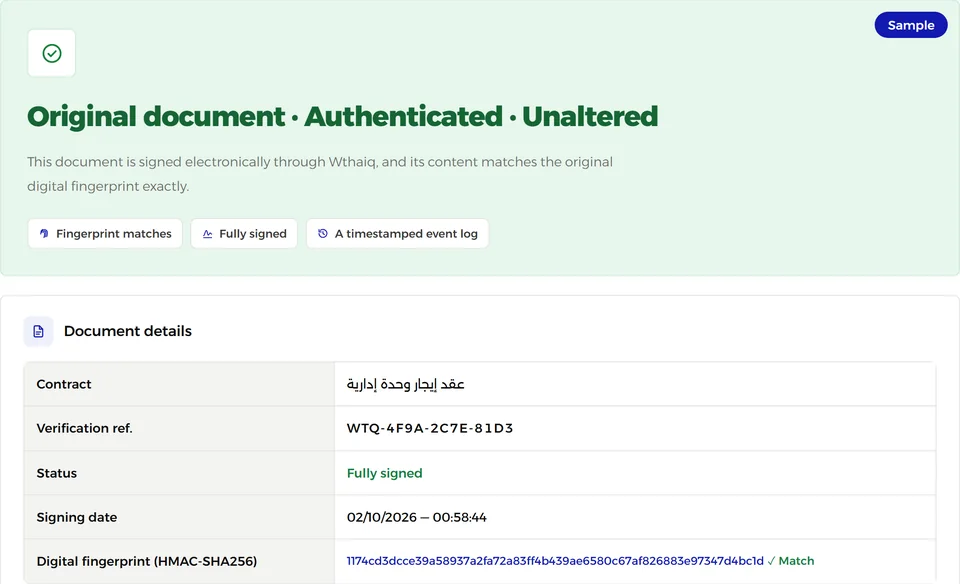
A page attached to every completed contract listing the parties, their signing times and how each was verified, with the document fingerprint, verification number and QR code. It is your proof of who signed, when and how.
Digital fingerprint that reveals any change
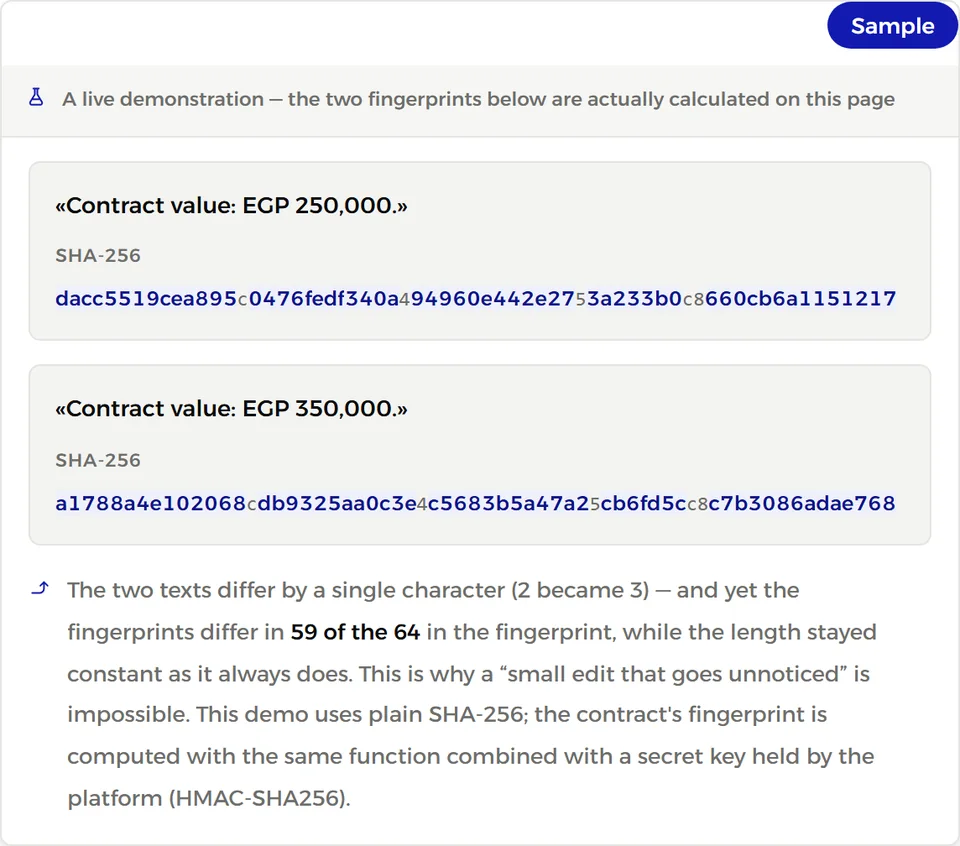
Each document gets a digital fingerprint (HMAC-SHA256 for platform contracts, SHA-256 for uploaded PDFs). Any change after signing, even a single character, changes the whole fingerprint and shows up on verification.
Audit trail (who opened it · who signed · when · from which IP)
For each party we record when the contract was sent, opened, when the code was confirmed and the contract signed, and from which IP address; the log is kept with the contract on the completion certificate.
A QR code and a verification number on the document
The document carries a QR code and a verification number that lead to the verification page, where anyone can see the document’s status and signing details.
A public verification page any party can use
A public page where anyone enters the verification number to see the document’s status and signing date, no account needed. The page warns if the stored contract file no longer matches its recorded fingerprint.
Exportable evidence package
A JSON file combining the sealed signing record, document fingerprints and verification data, which the contract owner downloads from the verification page after signing in. An independent expert can check its seal with our published public key, and its timestamp where present.
Independent third-party timestamp
The signing record is timestamped by an independent external timestamp authority under RFC 3161, so the signing time is attested by a party other than us. With token signing, the signature and timestamp are embedded in the PDF using PAdES.
Passwordless sign-in code
Sign in with a one-time code sent to your email, so there is no password to forget, steal or reuse elsewhere.
Email alert on new-device sign-in
You receive an email when your account is accessed from a new device, with a link to secure your account immediately if it was not you.
Connected devices and sessions
See the devices signed in to your account and end any or all sessions in one click. An account works on one device at a time, so signing in on a new device ends the others automatically.
Account data export and deletion
Download a copy of your account data at any time, and request account deletion from settings under our privacy policy.
Reports and statistics
Your dashboard shows your contract numbers: total, signed and pending, completion rate, average time to sign and monthly creation activity, for the period you choose.
Email open and link visit tracking
See the open and click rates of signing emails, visits to signing links and the average time to first open. Open rates are approximate, because some email apps block images or open them automatically.
Transactions and payments
Your dashboard lists your purchases and payments, such as your subscription, extra credits and identity credits, with the date and amount of each, filterable by period.
Support channel
Reach us by email or the contact form on every plan; Enterprise and Strategic requests are handled with priority.
Dedicated account manager
A named person from our team who knows your setup and needs, so you contact them directly instead of starting over with each request.
Google Drive
A PDF copy of every contract fully signed after connecting is saved automatically to your company account on Google Drive, and your copy in Wthaiq stays as it is.
OneDrive
A PDF copy of every contract fully signed after connecting is saved automatically to your company account on OneDrive, and your copy in Wthaiq stays as it is.
Dropbox
A PDF copy of every contract fully signed after connecting is saved automatically to your company account on Dropbox, and your copy in Wthaiq stays as it is.
API and webhooks
Connecting your systems to Wthaiq has its own plans on the developer portal, starting with a free test mode with daily limits; team plans do not include it.
Sends per year
One send is one signer on a signature request, so a contract signed by three parties uses three sends, with a maximum of five signers per request. The balance renews with your subscription year.
Extra send, from the wallet
If you go over your plan’s sends, sending continues as long as your prepaid wallet has funds, and each extra send is deducted from it automatically at your plan’s rate, which falls as plans grow.
Cost per included send
The yearly plan price divided by its sends, for comparing plans.
Developer portal members
How many people from your team can sign in to the portal with their own accounts, each with the role and permissions you set.
Free test mode with daily limits
Try the full integration with test keys at no cost on every plan, including Trial, within daily limits per account: 20 test requests and 50 emails, at most 5 signers per request, and at most 10 recipients per bulk send. Identity verification is simulated, no WhatsApp messages are sent, and test signatures are for trying out only and carry no legal weight.
Live sending (non-test)
Live sending produces real signatures and a full evidence record, and requires a paid plan and a verified company. Test mode is available immediately without verification.
Signer identity check, from the wallet
When you request identity verification, the signer verifies with an official ID and a live face photo through a specialist third-party provider, charged to your wallet. The result reaches you via webhooks, and you can query it through the API.
The wallet balance never expires
What you top up stays until you use it and does not expire with your subscription year.
WhatsApp delivery is free
Sending signing links and verification codes by WhatsApp is not charged to your wallet or your sends.
Interactive reference and OpenAPI spec
Every endpoint is documented in an interactive reference, with an OpenAPI specification you can import into your tools to generate code and test requests.
Separate test and live keys, plus read-only keys
Each account has test and live keys that never mix, a secret key for servers and a public key for browsers, and you can make a key read-only so it cannot create requests or change anything.
Idempotency keys
Send a unique key with a request; if you retry it after a network failure, the API returns the original result instead of creating a second request or charging twice.
Software development kits (SDKs)
Official libraries for five languages and platforms: three for your server that call the API, and two that show the signing page inside mobile apps.
Rate limit
The API accepts up to one hundred requests every ten seconds per account, across all its keys, protecting your account and service from runaway code.
Application programming interface (API)
A JSON REST API to create and track signature requests, manage templates, signers, documents and webhooks, and check usage and balance.
Automatic event notifications (Webhooks)
The platform notifies your server instantly on every event, including sent, viewed, code confirmed, identity verified, signed, declined and completed (nineteen event types), so you never need to poll.
Templates
Set up a template with its fields once, then send signature requests from it through the API by passing only the field values.
Delivery by email and WhatsApp
Choose in each request how to reach the signer: email, WhatsApp or both, or “link only” to deliver the signing link yourself.
Automatic reminders
Signers get automatic reminders until they sign, raising your completion rate without manual follow-up.
Signed webhooks
Each webhook carries a Wthaiq-Signature header with an HMAC-SHA256 signature and timestamp, so your server can confirm it came from us, was not altered and is not a replay.
Automatic webhook retries
If your server does not accept a webhook, we retry automatically at growing intervals, from one minute up to a day, for up to nine attempts over about two days.
Completion certificate and audit trail via API
Fetch the completion certificate data and full audit trail (event, actor, IP and time) for any completed request and store it in your system.
Download the signed PDF
Download the final signed copy directly from the API with your secret key once the request completes, together with its SHA-256 fingerprint to confirm the file is intact.
Evidence record for every signature, as JSON
Every completed live request has an evidence record with each signer’s status, signing time, IP, code confirmation time, the document fingerprint and verification reference, available from the API as JSON for independent verification.
Look up a document by verification number
Check any document’s status by verification number from your own system, just as visitors do on the public verification page.
Identity verification events in webhooks
You receive each signer’s identity result by webhook as soon as it is decided: approved, in review, step resubmission requested, or declined.
Embedded signing on your site
Your customer signs inside a frame on your page without leaving your site, and the frame is shown only on an approved domain in your account.
Embedded sending console
Two lines on your site give your team a full sending form in your brand colors: choose a template, fill its fields, add signers, send and track status. It runs on a public key limited to your approved domains, with a daily cap that limits damage if it leaks.
Approved domains
Prove you own your domain with a DNS record or a file on your site, then we review and approve it. Your public key and return links work only under approved domains.
A signing page with your company's name, colours and welcome text, without mentioning Wthaiq
The signing page and its messages show your company name, logo, colors and welcome text, and you can hide Wthaiq’s name. The verification number stays visible so the signer can verify the document.
Return to your site after signing
After signing or declining, the signer returns automatically to a page on your site, with a visible countdown they can stop. Return links are accepted only under an approved domain.
Your company's own domain
Signing links open on a domain of your company instead of Wthaiq’s address, so signers see your name from the start.
Signing in order
Parties sign one after another in the order you set; the next party cannot open the contract until the previous one signs, and is invited by email or WhatsApp when it is their turn. With “link only”, you deliver the link and they sign from it when their turn comes.
Workflows
Save your signing setup, such as channels, verification method, order and return, as a versioned workflow, then create signing sessions from it with a single ID.
Bulk sending through the API
Send the same contract to many signers in one request, each receiving a copy filled with their details.
Signer attachments
Require the signer to attach a photo of their ID before their signature completes; it is stored with the request, and the attachment event appears in the request log.
Access code
A code you set for each signer and share separately; the signing link opens only with it.
Signing with a digital certificate (token) issued by an ITIDA-licensed certification authority
The signer signs with their digital certificate on a token from an electronic certification provider, and the signature is embedded in the PDF using PAdES. The platform checks the certificate, and only certificates that pass the check are marked as verified in the evidence.
Access restricted to specific IP addresses
Your secret key is accepted only from the server IP addresses you list, so it is useless if leaked and used elsewhere. This is separate from restricting portal members’ sign-in.
Priority support
Your support requests are handled first, by a team familiar with your integration.
Google Drive
A PDF copy of every live signature request completed after connecting is saved automatically to your company account on Google Drive. Test-mode requests are not saved.
OneDrive
A PDF copy of every live signature request completed after connecting is saved automatically to your company account on OneDrive. Test-mode requests are not saved.
Dropbox
A PDF copy of every live signature request completed after connecting is saved automatically to your company account on Dropbox. Test-mode requests are not saved.
Request log
See every API request made with your keys, with its status and time, so you can trace errors without digging through your servers.
Reports, usage and balance
Track used and remaining sends, your wallet balance and deductions, in the portal and through the API itself.
Portal audit log
Every portal action is logged with who did it, such as creating or deleting a key, changing settings or adding members, so you know who did what and when.
Two-step verification
Each member can turn on authenticator-app codes, so an email code alone is not enough to sign in to the portal.
Ready roles and custom permissions
Add team members with ready roles, such as API developer, accountant, CTO, operations and read-only, and customize each member’s permissions; no one can grant more than they have.
Device and IP limits per member
Decide for each member whether they work from one device or several, and optionally limit their sign-in to specific IP addresses.
{
  "object": "evidence",
  "format": "wthaiq-evidence-v1",
  "verify_ref": "WTQ-4F9A2C7E81D3",
  "record": {
    "record_version": 1,
    "document": {
      "doc_no": "sr_8KQ2Ex4mPz",
      "completed_at": "2026-07-08 12:02:11"
    },
    "signers": [{
      "name": "Sara Example",
      "status": "signed",
      "ip": "203.0.113.24",
      "evidence": {
        "otp_verified_at": "2026-07-08 12:01:40",
        "doc_hash": "3f9a2c7e…d9c3b7e4"
      }
    }]
  },
  "seal": {
    "signature_alg": "ed25519",
    "trust_url": "https://wthaiq.com/trust"
  }
}POST /hooks/wthaiq HTTP/1.1
Content-Type: application/json
Wthaiq-Signature: t=1791234567,v1=5f2c9a…e81d3b
Wthaiq-Event-Id: evt_3Xb7Qn2K
{
"type": "signature_request.completed",
"data": { "id": "sr_8KQ2Ex4mPz" }
}